Selection & Interfaces
Chapter 5 — Core product overview, technical requirements, interface design, and wiring logic
5.1 Core Product Overview
The boundary security product portfolio encompasses six core product categories, each available in on-premises appliance, virtual appliance, and cloud-native service form factors. The selection of form factor depends on deployment context, latency requirements, and operational model. The following diagram shows the four primary hardware appliances in the boundary security portfolio, representing the physical manifestation of the NGFW, WAF, NDR, and SIEM components.
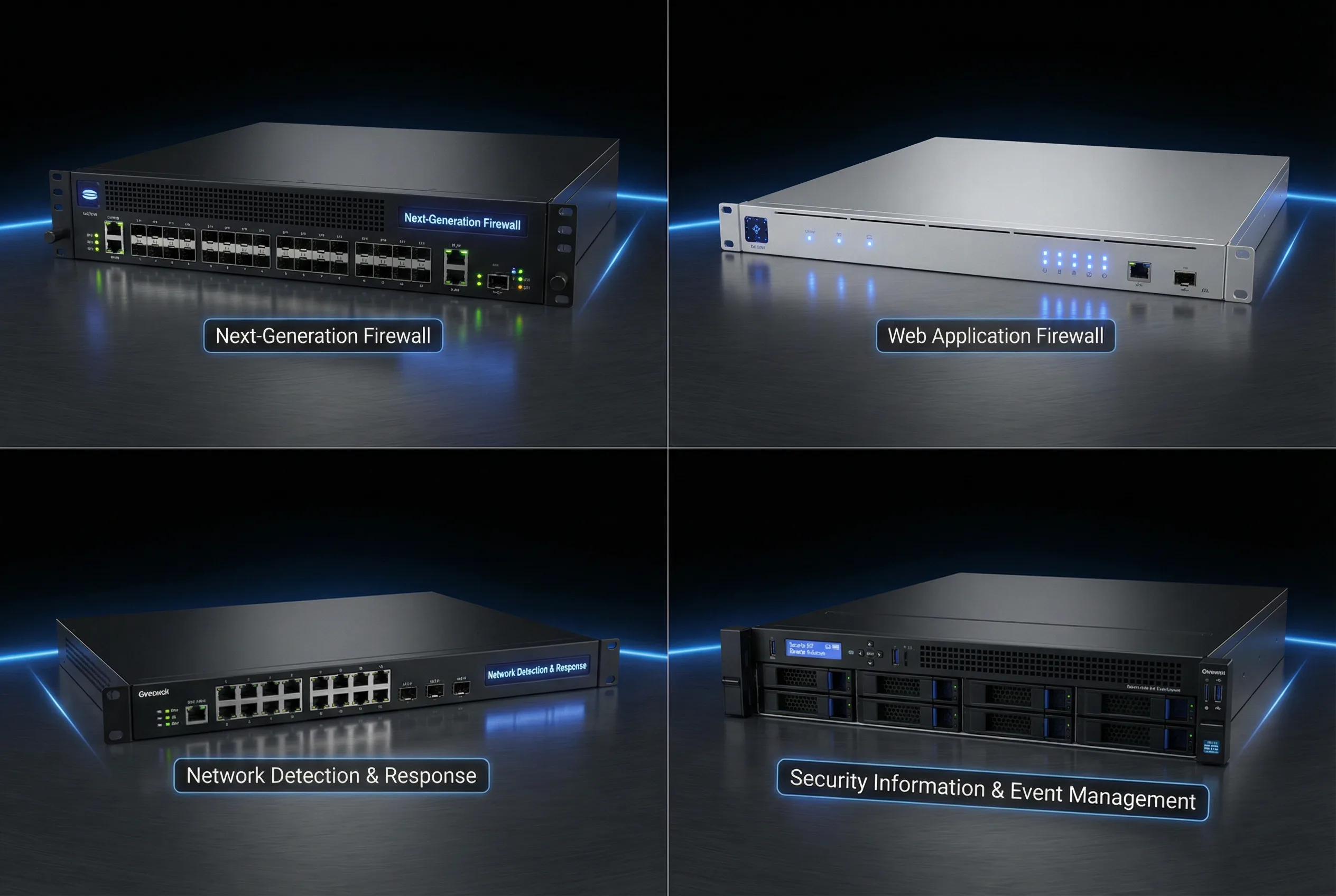
Figure 5.1: Core Security Product Portfolio — Enterprise NGFW (top-left), Web Application Firewall (top-right), Network Detection & Response sensor (bottom-left), and SIEM/Log Management server (bottom-right)
| Product | On-Prem Appliance | Virtual Appliance | Cloud-Native Service | Primary Use Case |
|---|---|---|---|---|
| NGFW | Best — highest performance | Possible — for virtualized DC | Possible — FWaaS/SASE | All boundary types; core enforcement |
| WAF/API Gateway | Best — dedicated appliance | Possible — container-based | Best — CDN-integrated WAF | Internet-facing web/API services |
| DDoS Protection | Possible — on-prem scrubbing | Not recommended | Best — upstream scrubbing | Volumetric and L7 attack mitigation |
| ZTNA | Possible — connector model | Possible — connector VM | Best — cloud broker | Remote access, vendor access |
| NDR/IDS | Best — dedicated sensor | Possible — virtual sensor | Possible — cloud flow analysis | Passive detection at key vantage points |
| SIEM/SOAR | Possible — on-prem cluster | Possible — VM cluster | Best — cloud SIEM | Centralized logging, correlation, response |
5.2 Core Product Functions
Next-Generation Firewall (NGFW)
The NGFW is the central enforcement component of the boundary security architecture, providing deep packet inspection and policy enforcement at L3 through L7. Its comprehensive feature set enables granular control over applications, users, and content, while its HA capabilities ensure continuous enforcement during device failures or maintenance.
| Function | Description | Key Metric |
|---|---|---|
| Application Identification (App-ID) | Classifies traffic by application regardless of port or protocol | App signature database freshness |
| User Identity Integration (User-ID) | Maps traffic to authenticated user identities via IdP/AD | Identity coverage percentage |
| Intrusion Prevention System (IPS) | Inline threat detection and blocking with signature + behavioral rules | Detection rate, false positive rate |
| URL Filtering | Category-based web access control with custom allow/deny lists | Category coverage, block accuracy |
| TLS/SSL Inspection | Decrypts and inspects encrypted traffic per policy | TLS inspection TPS, coverage % |
| NAT (SNAT/DNAT) | Network address translation for internet egress and service publishing | NAT table capacity |
| HA State Synchronization | Replicates session state to standby for hitless failover | Failover time, session preservation rate |
| API Automation | REST API for policy management, log retrieval, and SOAR integration | API response time, rate limits |
WAF / API Gateway
The WAF and API gateway protect internet-facing applications from web exploits, API abuse, and bot-driven attacks. Operating in a positive security model for critical applications, the WAF validates that all requests conform to expected patterns before forwarding them to backend services. The API gateway adds authentication, rate limiting, and schema validation for API endpoints.
| Function | Description | Key Metric |
|---|---|---|
| OWASP Top 10 Rules | Signature and behavioral rules covering all OWASP Top 10 categories | OWASP test coverage % |
| API Schema Validation | Validates API requests against OpenAPI/Swagger schema definitions | Schema coverage, validation accuracy |
| JWT/OAuth Enforcement | Validates authentication tokens and enforces authorization policies | Token validation success rate |
| Rate Limiting | Per-client, per-endpoint, and per-user rate limits with burst allowance | Rate limit accuracy, false positive rate |
| Bot Management | Distinguishes legitimate bots from malicious crawlers and scrapers | Bot detection accuracy |
| Virtual Patching | Blocks exploitation of known vulnerabilities before patches are applied | CVE coverage, patch lag reduction |
| API Discovery | Automatically discovers and inventories API endpoints from traffic | Endpoint coverage, shadow API detection |
| Canary Policies | Staged rule deployment to detect false positives before full enforcement | Canary traffic %, false positive detection |
5.3 Technical Requirements and Sizing
Accurate capacity sizing is critical to preventing performance-related security bypasses and service outages. The following table defines the key technical requirements with quantitative targets and verification methods. Mismatch between actual traffic and device capacity is one of the most common causes of security control failures in production environments.
| Category | Requirement | Typical Target | Verification | Mismatch Consequence |
|---|---|---|---|---|
| Throughput | Firewall L3/L7 throughput | ≥ peak × 1.5 | Load test at 95th percentile | Congestion, latency spikes, outage |
| TLS TPS | SSL decrypt transactions per second | Sized by TLS inspection policy scope | Benchmark with representative traffic | Users bypass security via TLS; or latency forces bypass |
| CPS | New connections per second | ≥ peak × 2 | Stress test with synthetic traffic | SYN drops, application failures during traffic spikes |
| Concurrent Sessions | Maximum simultaneous sessions | ≥ peak × 2 | Monitoring during peak periods | Random session drops, user disconnections |
| HA Failover | State sync + failover time | < 30 seconds (target < 1s with state sync) | Quarterly failover drill | Prolonged downtime; session loss without state sync |
| Interface Speed | 10/25/40/100G ports as required | Per topology BOM | BOM check + physical verification | Bottlenecks at interface boundaries |
| Logging | Syslog over TLS + REST API | Required for all devices | Integration test with SIEM | Audit failure; detection blind spots |
| Cloud/IaC | Terraform/Ansible/API support | Required for cloud deployments | CI/CD pipeline test | Configuration drift; inconsistent policy |
5.4 Connection & Interface Design
The interface design defines three distinct planes of connectivity for boundary devices, each with specific requirements for protocol, security, and redundancy. Strict separation of these planes is essential to prevent management exposure from affecting data plane availability, and to ensure that administrative access remains available even during data plane incidents.
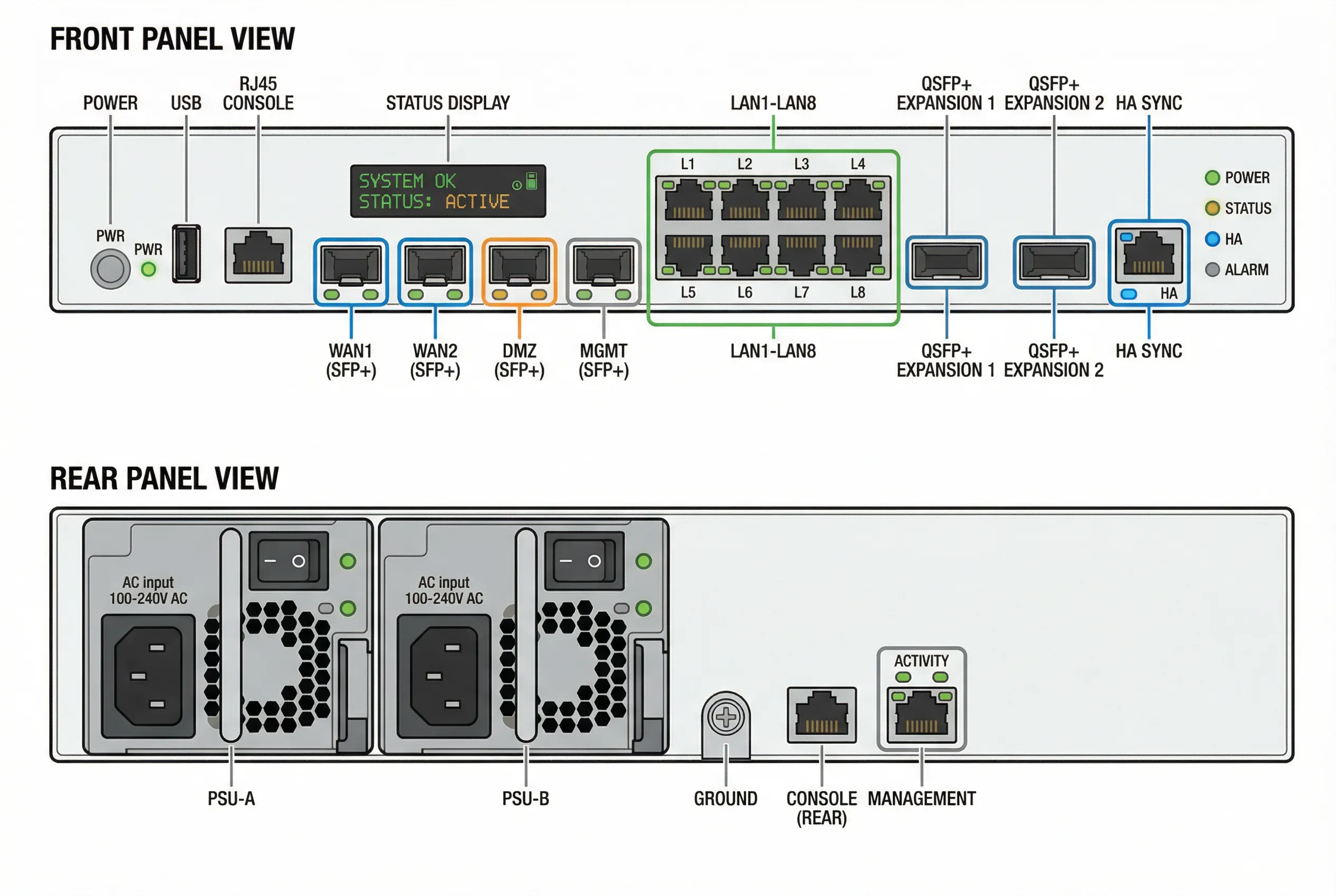
Figure 5.2: NGFW Interface & Port Diagram — Front panel with color-coded port groups (blue: WAN, orange: DMZ, green: LAN, gray: management) and rear panel with dual PSU, grounding, and console ports
| Interface Class | Protocol/Technology | Security Requirements | Redundancy |
|---|---|---|---|
| Data Plane | Trunk/access ports, routed interfaces, VLAN tags, VRF separation | No management traffic; strict VLAN separation | LACP/MLAG; cross-connected to both devices |
| Control Plane | BGP/OSPF routing adjacencies, SD-WAN overlay protocols | MD5/SHA authentication on routing protocols | Dual routing adjacencies; BFD for fast failure detection |
| Management Plane | SSH/HTTPS with MFA via bastion host; OOB management network | IP allowlist; MFA mandatory; no production VLAN access | Dedicated OOB network; console server for break-glass |
| HA/Sync Plane | Proprietary HA protocol over dedicated interfaces | Encrypted state sync; dedicated physical links | Dual HA links; physically separate from data plane |
5.5 Wiring Fixes and Troubleshooting
Incorrect physical wiring is a frequent source of hidden single points of failure and HA failures that only manifest during actual incidents. The following table documents eight common wiring mistakes and their correct solutions, based on real-world deployment experience.
| # | Symptom | Root Cause | Correct Fix |
|---|---|---|---|
| 1 | Routes disappear after failover | Routing adjacencies not re-established on standby | Verify routing adjacency configuration on both NGFW nodes; check preemption settings |
| 2 | Sessions drop randomly under load | Asymmetric routing causing stateful inspection failures | Check ECMP hashing and ensure symmetric routing; use PBR if needed |
| 3 | HA flaps repeatedly | HA heartbeat link shared with data traffic causing congestion | Ensure dedicated physical interfaces for HA heartbeat; increase heartbeat timeout |
| 4 | WAF cannot reach backend | DMZ VLAN tagging mismatch or backend ACL blocking WAF source IP | Verify VLAN tags on DMZ switch ports; add WAF management IP to backend ACL |
| 5 | Logs missing from SIEM | Syslog TLS certificate expired or firewall egress rule blocking SIEM port | Renew syslog TLS certificates; verify firewall allows UDP/TCP 514 or TCP 6514 to SIEM |
| 6 | Single ISP failure takes down all traffic | Both routers connected only to same ISP or single router uplink | Cross-connect both routers to both ISPs; verify BGP failover with controlled test |
| 7 | Management access lost during incident | Management traffic on production VLAN blocked by firewall policy | Move management to dedicated OOB network; configure console server for break-glass |
| 8 | TLS inspection causes application errors | Certificate pinning in applications or expired inspection CA certificate | Exclude certificate-pinned applications from TLS inspection; renew inspection CA |