Tools & Accessories
Chapter 8 — Accessories list, installation tools, and consumables for boundary security deployments
The quality and completeness of accessories, tools, and consumables directly impacts the reliability and maintainability of the boundary security system. Using substandard or incorrect accessories is a common source of intermittent failures, security gaps, and delayed recovery during incidents. This chapter provides a comprehensive reference for all accessories, tools, and consumables required for deployment and ongoing maintenance.
8.1 Accessories Checklist
The accessories checklist below covers all six categories required for a complete boundary security deployment. The integrated diagram provides a visual overview of all accessory categories and their key items.
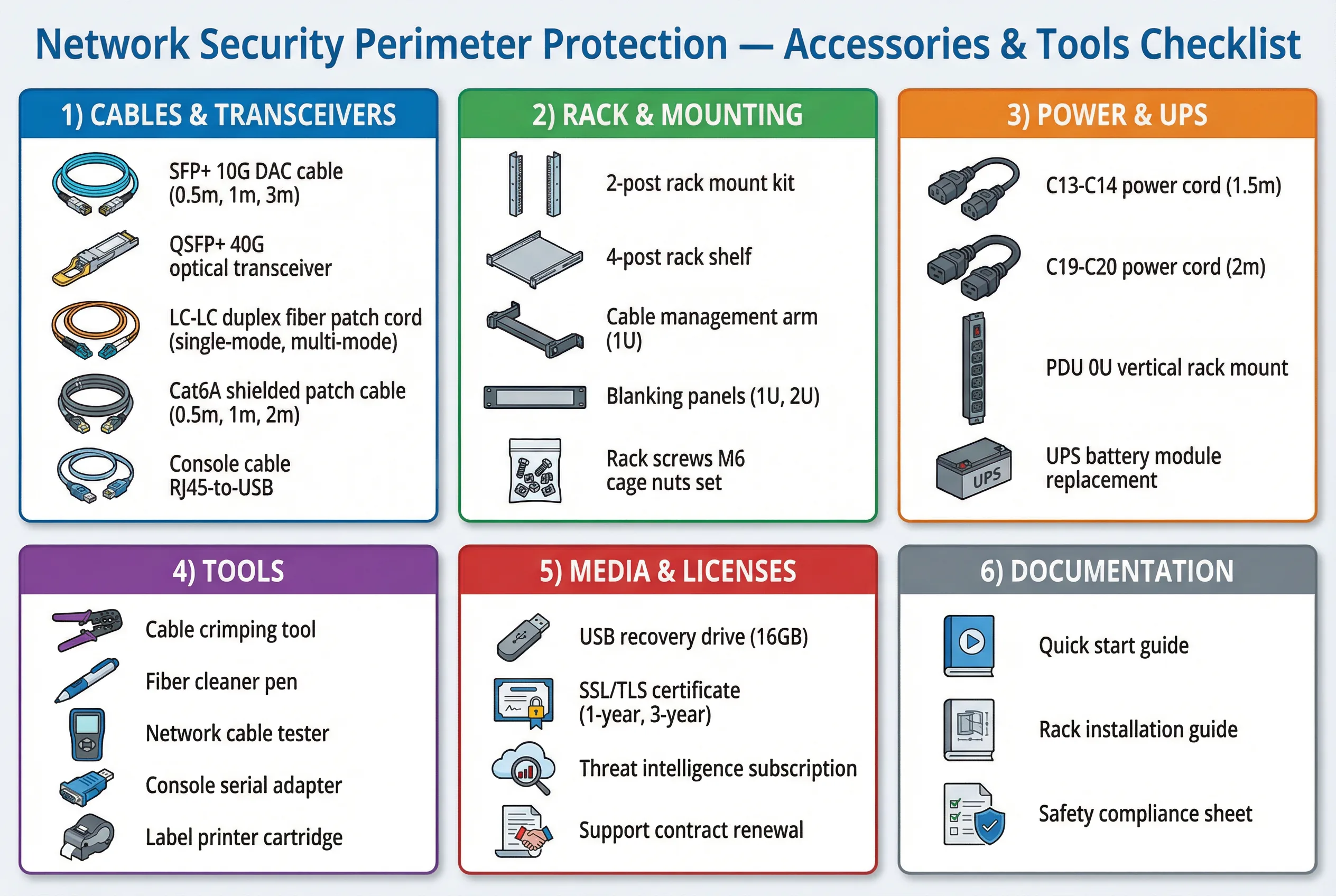
Figure 8.1: Network Security Perimeter Protection — Accessories & Tools Checklist covering six categories: Cables & Transceivers, Rack & Mounting, Power & UPS, Tools, Media & Licenses, and Documentation
| Product Name | Description | Specification | Purpose | Selection Tips | Poor Quality Risk | Inspection Method |
|---|---|---|---|---|---|---|
| SFP/SFP+ Modules | Optical and DAC transceivers for uplinks | 1G/10G/25G, SR/LR/DAC | Reliable high-speed links | Match vendor compatibility list + distance requirement | Link flaps, DOM errors, reduced MTBF | Check DOM diagnostics + vendor compatibility ID |
| Patch Panels | Structured cable termination and management | Cat6A / Fiber LC, 24-port or 48-port | Maintainability and cable organization | Choose label-friendly panels with clear port numbering | Crosstalk, insertion loss, difficult troubleshooting | Fluke cable certification test report |
| Rack PDUs | Per-outlet metered power distribution units | Metered, dual feed, C13/C19 outlets | Power resilience and load monitoring | Per-outlet metering; compatible with UPS output | Overheating, undetected overload, outlet failure | Thermal scan; per-outlet load measurement |
| Console Cables | Serial console access cables for OOB recovery | RJ45-to-USB, RJ45-to-DB9, 1.8m | Out-of-band device recovery access | Durable connectors; verify compatibility with console server | Lost console access during critical incidents | Physical inspection; connectivity test before deployment |
| Tamper Seals | Serialized tamper-evident security seals | Serialized, void-on-removal, UV-visible | Anti-sabotage evidence and deterrence | Audit-friendly serial numbering; match to log system | Easy removal without evidence; undetected tampering | Seal log + photographic record at installation |
| Port Blockers | Keyed physical port blocking inserts | Keyed sets for RJ45, USB, SFP | Reduce attack surface on unused ports | Standardize key sets; maintain key inventory | Unauthorized device connection; USB attack vectors | Visual inspection; verify all unused ports blocked |
8.2 Installation Tools
The following installation tools are required for a professional and reliable boundary security deployment. Using incorrect tools or misusing correct tools is a frequent cause of installation defects that only manifest as intermittent failures weeks or months after deployment.
| Tool | Description | Purpose | Key Parameters | Misuse Risk | Applicable Phase |
|---|---|---|---|---|---|
| Cable Tester / Certifier | Certifies copper and fiber cable performance | Quality assurance for all cable runs | Cat6A / Cat7 / OM3 / OS2 profiles | False pass result if wrong cable profile selected | Installation & Acceptance |
| Torque Screwdriver | Controlled torque fastening tool | Prevent loose or over-tightened rack screws | 0.5–5 Nm adjustable range | Over-torque damages rack threads; under-torque causes vibration loosening | Installation |
| Fiber Cleaner | One-click fiber optic connector cleaner | Reduce insertion loss and prevent contamination | One-click type; LC/SC compatible | Scratching or contaminating connector end-face | Installation & Maintenance |
| Label Printer | Industrial label printer for durable cable labels | Traceability and faster troubleshooting | Heat-shrink or laminated labels; 6–24mm width | Wrong label causes misidentification during incidents | All phases |
| Fiber Inspection Scope | Digital fiber end-face inspection microscope | Verify fiber connector cleanliness before connection | 400× magnification; IEC 61300-3-35 pass/fail | Connecting dirty fiber causes permanent damage to transceiver | Installation & Maintenance |
8.3 Consumables List
Consumables are often overlooked in deployment planning but have a direct impact on system stability, maintainability, and airflow management. The following table documents the required consumables with specifications and quality requirements.
| Consumable | Description | Specification | Use | Why It Impacts Stability | Poor Quality Risk | Recommended Practice |
|---|---|---|---|---|---|---|
| Velcro Straps | Reusable hook-and-loop cable bundling straps | 12–20mm width, 200–300mm length | Cable management and bundling | Prevents cable stress and bend radius violations | Breakage causes cable sag; avoid zip ties on fiber | Use Velcro only; never zip ties on fiber cables |
| Heat-Shrink Labels | Durable heat-shrink cable identification labels | 3:1 shrink ratio; 4–12mm diameter | Permanent cable identification | Enables faster recovery and reduces misidentification | Peeling labels cause misidentification during incidents | Apply standard naming convention; verify before shrinking |
| Blanking Panels | Rack unit filler panels for unused rack space | 1U and 2U sizes; tool-less snap-in | Airflow management in rack | Prevents hot air recirculation through empty rack units | Warping or missing panels create hotspots | Fill all unused rack units; verify during thermal mapping |
| Dust Filters | Replaceable rack intake dust filters | Size-matched to rack intake; G3 or G4 filtration | Reduce dust accumulation in rack | Prevents fan clog and reduced airflow over time | Reduced airflow; fan bearing wear; overheating | Clean or replace quarterly; monitor differential pressure |